A Trustworthy PCB and Electronic Manufacturing Enterprise! Contact Us



Behind every smart home sensor, LED flashlight, toy controller, and complex computer system lies the fundamental science of electronics. While advanced multi-layer processor boards inside smartphones feature thousands of microscopic traces and complex microchips, every electronics journey starts with understanding basic circuit layouts. Before diving into complex high-density designs, learning how components connect, exchange signals, and draw power on a basic platform builds essential hardware intuition. Building a simple circuit board allows hobbyists, students, and product inventors to transform abstract electrical schematics into functional physical devices while mastering core hand-soldering and layout fundamentals.
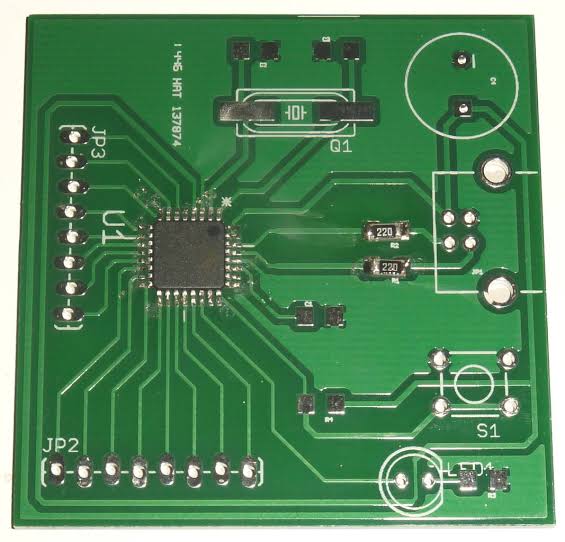
simple circuit board
Core Anatomy and Basic Layers
To build your first simple circuit board successfully, it helps to understand the basic physical layers that make up modern printed circuit boards (PCBs).
---Substrate (FR4): The core base material is typically an insulating fiberglass epoxy composite known as FR4. This rigid layer provides physical strength, preventing the board from flexing or snapping while holding electrical traces isolated.
---Copper Layer: A thin sheet of conductive copper foil is laminated onto one or both sides of the substrate. Etched copper traces act as metallic wires, routing electrical currents directly between component pins.
---Solder Mask: The colored polymer layer (often green, red, or blue) covers the copper traces. It protects copper from oxidation and prevents molten solder from creating unwanted short circuits between neighboring pads.
---Silkscreen: The top white ink layer prints numbers, symbols, component labels, and polarities (+ and -), guiding correct component placement during manual assembly.
For basic projects, designers choose between a single-sided board (copper on one side only) and a double-sided board (copper on top and bottom). Single-sided boards are ultra-economical and ideal for low-cost DIY projects, while double-sided boards offer much easier signal routing for slightly denser designs.
Fundamental Design Rules for Beginners and Makers
Transitioning a schematic drawing from a computer screen onto a physical substrate requires careful spatial layout planning. When creating a simple circuit board in design software like KiCad or EasyEDA, adhering to basic routing guidelines eliminates soldering headaches later on.
First, group related components logically. Place input connectors and power switches near the edges of the board, while keeping central components like microcontrollers or operational amplifiers centered. Second, use wider copper traces for power and ground lines (0.5 mm to 1.0 mm) to ensure low electrical resistance and cool operation. Finally, make component pads slightly larger than standard factory defaults if you plan to solder by hand. Larger pads provide more surface area for your soldering iron tip, helping solder flow smoothly into strong, volcano-shaped joints without lifting delicate copper foil off the board.
Essential DIY Tools and Hand Assembly Steps
Assembling your custom simple circuit board on a workbench is a fun, hands-on process that requires a few basic tools and a disciplined assembly order.
Set up a well-ventilated workspace equipped with a temperature-controlled soldering iron (set between 330℃ and 350℃), thin rosin-core solder wire, flush wire cutters, and safety glasses. Always follow the golden rule of manual assembly: solder components from shortest physical height to tallest. Begin by soldering low-profile components such as resistors, signal diodes, and ceramic capacitors. Once those are fixed in place, move on to medium-height parts like IC sockets and LED indicators, before finishing with tall components like electrolytic capacitors, relays, and heavy terminal blocks. This sequence keeps small parts flush against the board surface when you flip it over to solder, ensuring a clean physical alignment.
Testing, Troubleshooting, and Moving to Production
Before connecting a battery or power supply to your newly soldered circuit, taking a few minutes to conduct static electrical tests prevents component damage.
Grab a digital multimeter, switch it to the continuity testing mode, and check across your power inputs. If your multimeter buzzes when touching positive (VCC) and ground (GND), an accidental solder bridge or short circuit exists on the board. Inspect your solder joints under a bright magnifying glass to locate stray copper whisker leads or bridged pins. Once your board passes continuity checks, power it up and verify voltage levels at key component pins. When your prototype performs reliably on the workbench, you can easily export standard Gerber manufacturing files and order custom fabrication panels from an online PCB manufacturer for low-cost volume production.
Conclusion
Mastering fundamental electronic hardware principles provides the launching pad for all future technology innovation. While modern consumer electronics grow increasingly complex, the core concepts of component placement, power delivery, trace routing, and clean soldering remain identical across every hardware tier. Designing and hand-assembling a reliable simple circuit board gives makers, students, and engineers the practical baseline needed to debug hardware failures, understand physical schematics, and turn creative electronic concepts into robust working devices. By starting with clear physical layouts, practicing proper hand-soldering habits, and enforcing simple multimeter inspection checks, you can comfortably build hardware projects ready to bring your ideas to life.